I love, love, love the tumbler wraps. I am working on a bunch more that I will be happy to share here once they are done, so keep checking back!! I am working on giraffe, houndstooth, and a small and large polka dot style. (The polka dots posted below I consider medium.)
The wrap itself is easy to make. The challenge for me is getting it to line up correctly on the back so the wrap has a continuous pattern. I am hoping to tackle a couple more over the weekend!
If there is another pattern or style you would like to see, just comment on this post and I will give it a shot.
Happy rest of the week!!
Thursday, February 16, 2012

Friday, February 10, 2012
Polka Dot Tumbler Wrap

The polka dot wrap file should measure 11.548" wide by 5.925 " high. I make these to fit the 16 oz tumblers from Silkletter, they are my favorite. If you are not sure if it will fit your tumbler just print it out first, cut it out and see how the paper fits before cutting it in vinyl. Download the polka dot wrap here in SVG format. Download it here in DXF format (studio compatible).
EDIT: 2/11/12
The file cuts great and is the perfect size/layout for the tumbler it was designed for. Here is the proof:
 |
| Front |
 |
| Back |
 |
| Negative |
Monday, February 6, 2012
Steaming Cup of Love

Sunday, January 22, 2012
Zebra Tumbler Wrap

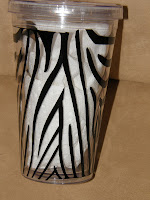
Here is the tumbler wrap I used on one of the tumblers in this post. There is a bit of a trick to it though. Depending on what program you use it with and how you have your import/open settings set, it may or may not bring it in at its actual size. To make sure, once you bring it into whatever program you use click on it and make certain its measurements are 11.548 wide and 5.9 something high. If they are not, lock the proportions in your program and type in the above width and it should automatically size your height. Another thing, this wrap is sized for the 16 oz. size tumblers from silkletter. It will not work so well on another sized tumbler. Good, luck I hope someone can use it!! Download here in SVG format. Download here in DXF format.
Wednesday, January 18, 2012
Tumblers
Here are some of the tumblers I put together this past weekend.
 This fish file can be downloaded in svg or dxf (silhouette) format at this post.

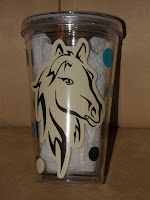
The horse file can be downloaded in svg or dxf (silhouette) format at this post. The font on Pam is Pacifico, one of my new favorites!!



I downloaded the Angry Birds svg files for this tumbler here, there are a ton of Angry Bird files, I LOVE them. The font on Jenny is BoyzRGross.


This one is for a runner, doing her first full marathon this spring!!
EDIT 2/3/12: Winged shoe file added. Find it here in SVG format and here in DSX format.
Thanks for looking!!


The horse file can be downloaded in svg or dxf (silhouette) format at this post. The font on Pam is Pacifico, one of my new favorites!!


I will post the file I used to wrap this tumbler in a later post. It requires a little bit of explaining. The font on Cheryl is Dominique. UPDATE 1/22/12: Download the zebra wrap from this post.


I downloaded the Angry Birds svg files for this tumbler here, there are a ton of Angry Bird files, I LOVE them. The font on Jenny is BoyzRGross.

Font here is Pacifico.


This one is for a runner, doing her first full marathon this spring!!
EDIT 2/3/12: Winged shoe file added. Find it here in SVG format and here in DSX format.
Thanks for looking!!
Monday, January 16, 2012
Some Files to Share
I have been busy making tumblers today. I made some of these files for them and want to share them with you. I am going to start posting my files in SVG and DXF format. The DXF format can be open in the Silhouette Studio software and cut on the Silhouette machines. If you want to convert an SVG file to a cuttable file in Silhouette Studio, click here, this post will tell you how to do it.
Here are some cutting files, I used them on a couple of the tumblers I made today. I will post project pictures in a day or two.
 Here are the downloads for the orange and yellow fish: DXF SVG
 Here are the downloads for the pink and green fish: DXF SVG
 Here are the downloads for the horse head: DXF SVG
Thanks for looking!!
Here are some cutting files, I used them on a couple of the tumblers I made today. I will post project pictures in a day or two.


Thanks for looking!!
Sunday, January 15, 2012
Converting SVG files to Use with Silhouette Studio Software
I am awaiting the arrival of my Silhouette Cameo machine. Yeah for me! I have been playing with the Silhouette Studio software. One thing I have learned is that you cannot use SVG files with the standard version of Silhouette software, however, you can convert SVG files to use with Silhouette Studio without upgrading to the designer edition. From here forward I will be posting my files in both SVG and DXF format so my Silhouette friends that use the standard version of Studio can cut them as well. DXF is a format that you can open, in cuttable format, in the standard version of Silhouette Studio. However, if there are SVGs out there you would like to use with your Silhouette Studio software, here is how you can convert them to DXF and open in Studio.
1. Download and install Inkscape if you do not already have it. You can download the most recent version for free here.
2. Launch Inkscape.
3. Open the SVG file you want to convert. (under the file menu, select "Open," and open up your SVG.)
4. Under the file menu select "Save As" and under the "save as file type" pull down menu, select "Desktop Cutting Plotter" (it is about half-way down.) When it asks you what type output you would like select "Use ROBO-Master type of spline output" and hit OK.
5. Launch your Studio software.
6. Go to "Open"under the file menu. Select "All files" from the file typedrop down menu. Find and select the DXF file you just saved out of Inkscape.
7. Viola, you can now cut it with your Silhouette out of your studio software or save it as a .studio file to cut later.
MAC USERS: SEE COMMENT FROM BANI BELOW FROM 2/5/13.
Thanks Bani for the insight for our Mac using friends!! (from my blog statistics I see there asre quite a few so this is invaluable information!!
There are a ton of SVG files out there and now you can use them with your Silhouette Studio software!!
Happy Cutting!
1. Download and install Inkscape if you do not already have it. You can download the most recent version for free here.
2. Launch Inkscape.
3. Open the SVG file you want to convert. (under the file menu, select "Open," and open up your SVG.)
4. Under the file menu select "Save As" and under the "save as file type" pull down menu, select "Desktop Cutting Plotter" (it is about half-way down.) When it asks you what type output you would like select "Use ROBO-Master type of spline output" and hit OK.
5. Launch your Studio software.
6. Go to "Open"under the file menu. Select "All files" from the file typedrop down menu. Find and select the DXF file you just saved out of Inkscape.
7. Viola, you can now cut it with your Silhouette out of your studio software or save it as a .studio file to cut later.
MAC USERS: SEE COMMENT FROM BANI BELOW FROM 2/5/13.
Thanks Bani for the insight for our Mac using friends!! (from my blog statistics I see there asre quite a few so this is invaluable information!!
There are a ton of SVG files out there and now you can use them with your Silhouette Studio software!!
Happy Cutting!
Subscribe to:
Posts (Atom)