Showing posts with label elements. Show all posts
Showing posts with label elements. Show all posts
Sunday, March 13, 2011
Another Tile

A Damask Tile

Thanks for looking!!
Saturday, March 5, 2011
Patterns To Make Your Own "Print" Vinyl
I have been making my own "print" vinyl by taking a pattern cut out of one color of vinyl and layering it over a contrasting color vinyl. There are several posts on my blog that offer svgs you can use to do this yourself. Find some of those here:
Animal Prints
Polka Dots
Camoflauge
Here are a few more you can use in much the same way:

Modified Houndstooth svg here

Swirl Pattern svg here

Complex damask svg here. (For those of you with lots of patience who like to weed!!)

A damask element here
Hope you find a use for one or two of them!! Thanks for looking!
Animal Prints
Polka Dots
Camoflauge
Here are a few more you can use in much the same way:

Modified Houndstooth svg here

Swirl Pattern svg here
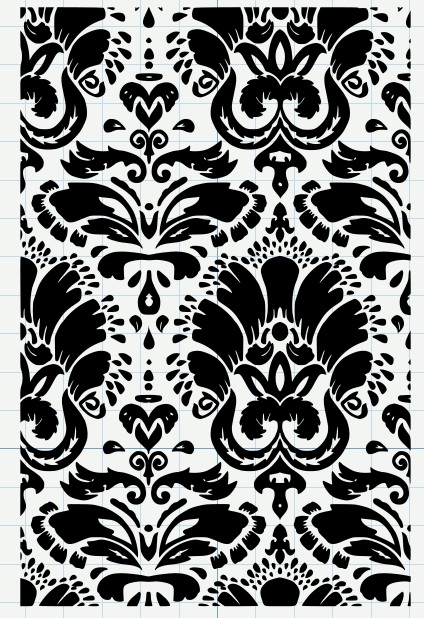
Complex damask svg here. (For those of you with lots of patience who like to weed!!)

A damask element here
Hope you find a use for one or two of them!! Thanks for looking!
Dots, Dots, and More Dots

Here are some polka dot files for you, easy enough to make, but nice to have in lots of sizes. These can be cut as polka dots to embelish your projects with. You can also use these to make your own polka dot vinyl. Just cut a page of the dots, weed, and then transfer all the dots with transfer tape to a base sheet of vinyl in a contrasting color, and presto, you have polka dot vinyl!!
Find the svg of the small dots here.
Find the svg of the medium dots here.
Find the svg of the large dots here.
Find the svg of the x-large dots here.
Make Your Own Camoflauge Vinyl


Find the svg of layer one here. Find the svg of layer two here. Find the svg of layer three here.
Tuesday, January 25, 2011
Dots, Ovals, and Rings . . . Using Your Scraps

Here is how I do it:
1. I place the shape/shapes on the mat that I want to cut
2. I copy the object
3. I do a paste autofill. If I am cutting a whole sheet I cut at this point.
5. When I am cutting scraps what I like to do is open a second page in my SCAL project. Then I place my scrap/scraps on my cutting mat and say if I have a scrap the is 4" x 9" I will go to the page that I auto filled with my shape and select and copy an area that is 4" x 9" and paste it on the clean page in the same area of the virtual mat where I placed my scrap. Does that make sense? It is the quickest way for me to cut lots of shapes out of my scraps. Happy scrappin'!!
Saturday, January 8, 2011
A Few More Shapes


Here are a couple more shapes to share. Enjoy!!
Shape on the left is here in SVG format.
Shape on the right is here in SVG format.
Saturday, January 1, 2011
A Few Shapes to Share
I made a few shapes to share with you. They would make great frames or tags or chalkboards cut out of chalkboard vinyl. They were all made uing SCAL and the basic shapes library.


Find the black file here in SVG format.

Find the purple file here in SVG format.

Find the pink file here in SVG format.
Friday, November 5, 2010
Swirl Monogram Frame
 Here is a SVG of the frame in this picture. I think it will be nice on a tile or a floating frame. The font on the L in the picture is Bickley Script and the name is Bookman. If you like it find the SVG here.
 Thanks for looking.
Tuesday, September 28, 2010
Sign on Post
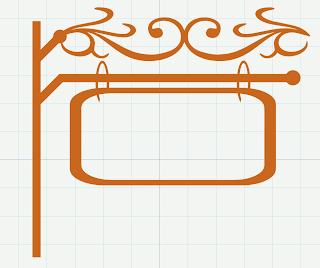
Here is a fun new svg. I made it using scal and the basic shapes library.
You can download the svg here if you like it. Enjoy!!
Subscribe to:
Posts (Atom)